

11. Not focusing on boundary values
Sometimes when our System Under Test might be using numbers in some conditions. For example, checking if a number is greater or equal:
class SomeKindOfCalculator {

    fun isValueOverTheLimit(number: Int): Boolean {
        return number >= 5
    }
}
We could write a passing tests using values which are far above or below the "limit":
@Test
fun sevenIsOverTheLimit() {
    val result = systemUnderTest.isValueOverTheLimit(7)

    assertEquals(true, result)
}

@Test
fun twoIsUnderTheLimit() {
    val result = systemUnderTest.isValueOverTheLimit(2)

    assertEquals(false, result)
}
But such tests will still pass even if we change the limit number, which is probably not a desired outcome. The number 5 is an important part of the SUT, so the tests should probably fail when it is changed by accident:
@Test
fun fiveIsOverTheLimit() {
    val result = systemUnderTest.isValueOverTheLimit(5)

    assertEquals(true, result)
}

@Test
fun fourIsUnderTheLimit() {
    val result = systemUnderTest.isValueOverTheLimit(4)

    assertEquals(false, result)
}
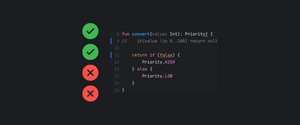
The first iteration of the tests can produce a False Negative (Test passes even though production code is broken). These types of tests give us a false comfort of security, because the regressions might not be caught by our automated test suite. It will be either need to be caught by manual testing, or worse it will land production and cause us some problems.
Focusing on boundary values, helps us avoid this issue altogether, giving us more confidence when releasing and shortening the development loop. Because if some issue is caught by a Manual test, we will probably be focusing on something different at the moment, but we will need to go back to this issue, change context, fix it and hope it will pass.
12. Using "private" functions in tests
Private functions are private for a reason, they are implementation details of the system under test and should not be exposed to the outside just for testing.
Instead of testing the private function, you should be testing the function which calls the private function, this is the expected public behavior of your SUT. Testing private functions, could lead to a situation where you have great test coverage, but production is still broken. The reason for this is that the private function is only called by tests and not by production code. This would not happen if tests were written for the public function.
If the private function has so many edge cases that it needs to be tested in isolation, then this means that it's a great candidate for a separate Unit. Extracting a separate class makes the behavior easier to understand, and allow for testing all the edge cases in isolation. Remember that you still need to make sure that the original SUT has a test which verifies that the extracted class is used, either through a mock, or just using the real implementation and checking just one condition branch / edge case.
13. Too generic test case naming
Naming is hard, and naming tests is no exception. A well written test case name, will convey what the expected behavior of our SUT is, and what is needed to achieve this desired outcome.
When a test with a good name fails, you should be able to figure out what went wrong, even without delving into the code. This is also helpful for example on automatic CI runs, which run outside your IDE.
When naming tests, most of the time you can avoid glue words like: "A", "The". As long as it is understandable, then the name is fine. Glue words usually don't add anything to the explanation, they just fit some grammar requirements, however there are cases when their use makes the name better.
In my opinion, the most important thing is to have the name focus on the SUT outcome / behavior and why it happened. This should be enough to understand what is going on.
If the name is really long or hard to understand, you can take it as a hint that maybe the SUT is doing too much and could be split into more units. This would make the tests more granular and easier to understand.
14. Conditions in tests
Tests should be as straight forward as it is possible, given we have this set-up when doing this action, then we expect that this happens. Once we start introduction conditions, it becomes much harder to understand.
Given we have this set-up when doing this action then we expect that this happens but only if we set up some value to A, if we set it to B, then something different happens. Take for example this test which asserts something different based on a boolean value from a Fake:
@Test
fun messageIsSentOnSenderSuccess() {
    fakeSender.isSuccessful = true

    systemUnderTest.send("1234")

    assertSentMessage()
}

@Test
fun messageIsNotSentOnSenderFailure() {
    fakeSender.isSuccessful = false

    systemUnderTest.send("1234")

    assertSentMessage()
}

private fun assertSentMessage() {
    if (fakeSender.isSuccessful) {
        assertEquals(fakeSender.messages, listOf("1234"))
    } else {
        assertEquals(fakeSender.messages, emptyList<String>())
    }
}
The above test case names are descriptive, but without diving into the implementation of assertSentMessage, it's hard to understand why both the success and failure test case use the same assertion.
A better approach would be to be more explicit with the assertion naming without using conditions:
@Test
fun messageIsSentOnSenderSuccess() {
    fakeSender.isSuccessful = true

    systemUnderTest.send("1234")

    assertMessageWasSent("1234")
}

@Test
fun messageIsNotSentOnSenderFailure() {
    fakeSender.isSuccessful = false

    systemUnderTest.send("1234")

    assertMessageWasNotSent()
}

private fun assertMessageWasSent(message: String) {
    assertEquals(fakeSender.messages, listOf(message))
}

private fun assertMessageWasNotSent() {
    assertEquals(fakeSender.messages, emptyList<String>())
}
This way, it's much easier to see the difference between the two test cases, because their assertions are different. Additionally, the message is passed in explicitly to the assertion helper function, making it easier to understand and is more extendable for future test cases.
One condition splits the logic into two branches and makes it harder to follow, because you have to keep in mind both paths. Tests should be plain simple and easy to follow reading from top to bottom, without going back and re-checking (e.g. other conditional branches).
15. Regular loops instead of Parameterized / Table Tests
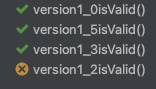
Sometimes we don't want to keep our test code DRY, so instead of repeating the same test with different values, we loop through it, but that is not the best idea. When such a test fails:
- We don't know which index / iteration causes the failure unless we provide some extra logic / infrastructure to make it possible, which in turns complicates our test code more.
- If we don't use soft assertions, a failure will prevent further iteration to run. So if it fails at the first index, the rest of them are not executed.
- We lose the ability to descriptively name our test, because we will only have one test.
@Test
fun validVersionsReturnTrue() {
    val validVersions = listOf("1.0", "1.2", "1.3", "1.5")

    validVersions.forEach { version ->
        assertEquals(systemUnderTest.isValid(version), true)
    }
}
If some version is not valid, we get something like this: expected: <false> but was:<true>. We don't know which version failed, just that something did fail. To help with this issue, we could add some print statements, or change the assertion to include the version name, but there is a better way.
Most testing frameworks provide an easy way to write multiple test cases for different input (Parameterized tests or Table tests):
@ParameterizedTest
@ValueSource(strings = ["1.0", "1.2", "1.3", "1.5"])
fun validVersionsReturnTrue(version: String) {
    assertEquals(systemUnderTest.isValid(version), true)
}
JUnit5 Parameterized test
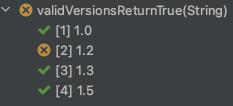
This approach is much more concise, and the best part is that it gives us a list of which test case passes / fails. No more confusion and debugging when trying to find out which input causes an error.
If your framework does not provide such tools, you can just create a "testCase" helper function:
@Test
fun version1_0isValid() = testCase("1.0")

@Test
fun version1_2isValid() = testCase("1.2")

@Test
fun version1_3isValid() = testCase("1.3")

@Test
fun version1_5isValid() = testCase("1.5")

private fun testCase(version: String) {
    assertEquals(systemUnderTest.isValid(version), true)
}
It is more verbose, but it is still better than a regular loop, because the test results are still easy to understand, so you know at first glance what failed.